> For the complete documentation index, see [llms.txt](https://docs.solcex.cc/llms.txt). Markdown versions of documentation pages are available by appending `.md` to page URLs; this page is available as [Markdown](https://docs.solcex.cc/how-to-register-on-solcex.md).
# How to Register on Solcex?
Registering for a Solcex account is a **quick, secure, and straightforward process**. Users can create an account using either a **valid email address** or a **mobile phone number** directly on the official Solcex platform.
### Step-by-Step Solcex ID Registration
Follow these steps to successfully register your new Solcex account:
{% stepper %}
{% step %}
#### Access the Platform:
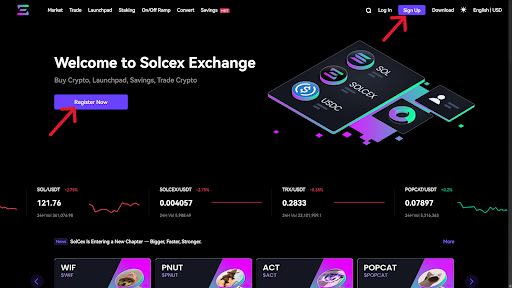
* Go to the [official Solcex website](https://www.solcex.cc/)
* Click the **"Register Now"** or **"Sign Up"** button, this button can be found in the upper-right corner of the homepage or within the main navigation bar.
{% endstep %}
{% step %}
#### Enter Your Registration Details:
* You will be presented with the registration form. Select your preferred method:
* **Email Registration:** Enter your primary email address.
* **Mobile Registration:** Select your country code and enter your mobile phone number.
* **Create a strong and secure password** (refer to the security tips for requirements).
{% endstep %}
{% step %}
#### Optional: Invitation Code:
* If you received an invitation, locate the **"Invitation Code"** field.
* Enter the provided code to benefit from potential referral rewards (this step is optional).
{% endstep %}
{% step %}
#### Review and Consent:
* Carefully read the Solcex Terms of Service.
* Check the box to confirm that you have read, understood, and agree to the platform's terms and conditions.
{% endstep %}
{% step %}
#### Submit and Verify:
* Click the "Sign Up" button to submit your information.
* A verification code will be sent immediately to the email address or mobile number you provided.
* Retrieve this code and enter it into the required field on the registration screen to **verify your account and complete the setup.**
{% endstep %}
{% endstepper %}
#### 🔒 Quick Security Tip
Use a unique, strong password that combines uppercase and lowercase letters, numbers, and symbols.
.png?alt=media&token=22e8dcb8-2fa4-4dea-90f9-cb13c7a9a765)
.png?alt=media&token=45f947c0-8b15-49df-970b-fb6926075a63)